


This article is intended for import operations staff who actually handle NACCS declarations, and is organized based on real-world examples of rejections and correction procedures.
Summary & Key Takeaways
In NACCS operations, the “system-compliant input” and “practical customs clearance judgment” often differ. For operational safety, it is recommended to prioritize case-by-case practical standards over strict procedural correctness.
New import officers should pay particular attention to points where errors are common, such as the relationship between DI and CU, registering amended declarations, and handling quota-controlled items.
Incorrect judgments may lead to:
- Returns of declarations
- Customs clearance delays
- Tax adjustments
- Delays in cargo receipt
New users tend to make mistakes in the following three areas:
• Incorrect DI–CU linkage
• Incorrect selection of the amendment reason code
• Inconsistency between the allocation certificate number and the declaration details
Introduction
NACCS (Nippon Automated Cargo and Port Consolidated System) is the central system for import customs clearance in Japan. However, beginners often face confusion when performing operations.
Common questions include:
- “What should I enter for DI and CU?”
- “How should quota-controlled items be declared?”
- “What should I be careful about when registering an amended declaration?”
These questions are difficult to resolve using manuals alone. Understanding practical experience and operational conventions is critical.
This article organizes practical decision-making guidelines and a glossary for first-time NACCS users.
This article is intended for operational users of NACCS.
For an overview of NACCS’s role in customs and the entire import process, see [link to general import overview].
Practical Decision Axes in NACCS Operations
Handling DI/CU (Declaration Item / Cargo Unit)
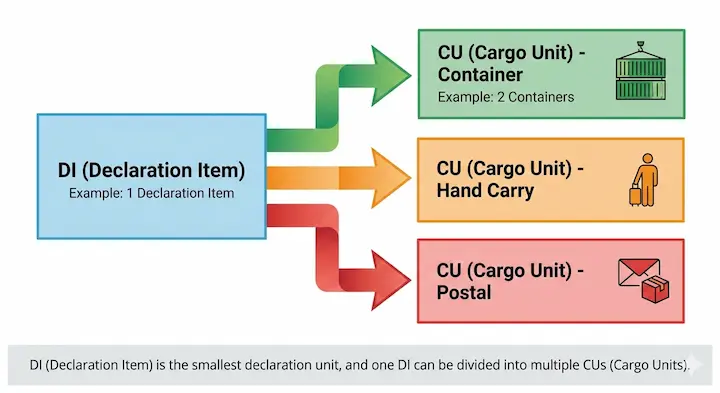
- DI (Declaration Item): The unit of customs declaration
- CU (Cargo Unit): The physical transport unit (container, hand-carry, etc.)
In practice:
- One DI may be split into multiple CUs, or multiple CUs may be consolidated into one DI.
- Incorrect input can cause clearance delays or returned declarations.
Examples:
- Small import by hand-carry: Set CU type to “HC” and link DI and CU one-to-one
- Container split: Link a single DI to multiple CUs
Registering Amended Declarations
- Selecting the correct Amendment Reason Code is critical.
- In practice, codes are determined by the type of correction, e.g., quantity, customs value, HS code.
- Choosing the wrong reason code may result in returns or rejection by customs.
To avoid classification mistakes, see our guide on using advance rulings for HS code determination [here].
Declaring Quota-Controlled Items
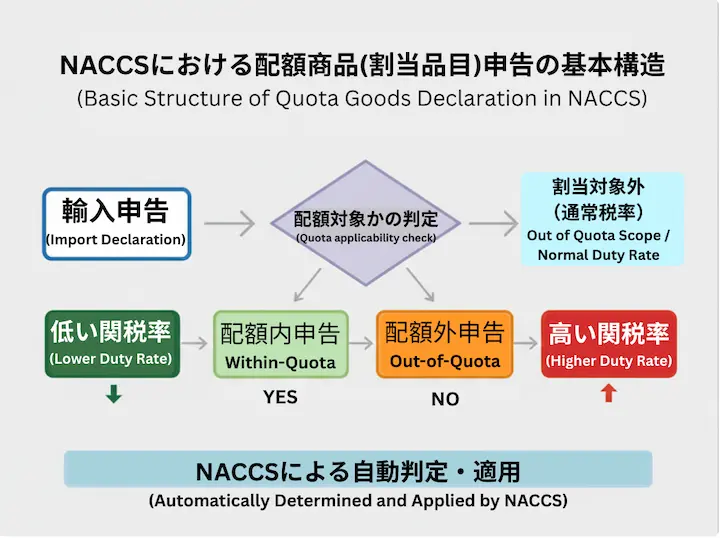
- Items subject to quota under Japanese import regulations must have correct codes and quota certificate numbers.
- The most common reason for returned declarations is a mismatch between the certificate number and the declared data.
Checklist Example:
- Verify certificate number length
- Ensure correct linkage with relevant item
- Check quantity units match
👉Quota-controlled items → items whose import is limited under Japanese import regulations, often requiring a certificate number.
NACCS Glossary for Practical Use
| Term | Meaning | Notes / Practical Points |
|---|---|---|
| NACCS | Japan’s export/import & port information system | Used by customs, customs brokers, and importers |
| DI | Declaration Item | One DI may be split into multiple CUs |
| CU | Cargo Unit | Container, hand-carry, postal parcel, etc. |
| Amendment Reason Code | Code indicating reason for amended declaration | E.g., quantity, value, HS code corrections |
| Quota Item Code | Code for quota-controlled items | Must link accurately to certificate number |
| HS Code | Harmonized System commodity code | Essential for duty calculation; errors lead to misclassification |
| Importer Code | Identifier for individuals or corporations | Corporations: corporate number; Individuals: customs-issued code |
Practical Checklist for Users
- Confirm DI/CU relationship (Is 1 DI split into multiple CUs?)
- Enter quota certificate numbers without error
- Check amendment reason code when submitting corrections
- Double-check HS codes, quantities, and units
- For first-time operations, submit declarations under the supervision of a customs broker or supervisor
Summary of NACCS Operations
- The three points most likely to cause confusion: DI/CU, amended declarations, and quota-controlled items
- First-time users should always use a checklist to minimize returns and delays
- Advanced error codes and complex amendment operations are covered in an advanced guide
Q&A for Beginners
Q: How should DI/CU be set for a small hand-carry import?
A: CU type “HC”, link DI and CU one-to-one.
Q: What if the quota certificate number is too long to input?
A: Confirm with your customs broker; use split input or the proper format.
Q: What happens if I choose the wrong amendment code?
A: The declaration may be returned or rejected. Always check the customs manual for the correct reason code.
For more information, see this article.
👉Correct Understanding of “Non-Applicable,” “No Declaration Required,” Prior Confirmation Requests, and Hand-Carry Procedures— Practical Decision-Making for Food Imports
Reference Materials
- Import Procedures – Overview (Japan Customs)
https://www.customs.go.jp/english/index.htm - Purpose and Process of Import Clearance (JETRO)
JETRO | Japan External Trade Organization - NACCS official
NACCS — Nippon Automated Cargo And Port Consolidated System, Inc. | NACCS